DNS Record Types Explained

How does a browser know where a websites lives ?
Actually, browsers don’t really know where the websites is because browsers talks in 0s and 1s but wait when you type google.com then how it opens google or when you search youtube then how it opens youtube? The answer lies in IP address. IP address looks like this "2001:4860:4860::8888" and since an ip address is hard to remember the developers comes with a clever idea. They thought we(humans) are great in remembering names so is it possible to convert this big chunk of number to a name described by the user/developer and hence there comes the DNS.
What is DNS?
DNS stands for Domain Name System.
It is also knows as Phone Book of the Internet.
You know the name: "Rahul Kinanara Store"
You need the number to call them: 1234567890.
DNS Caching:
Querying DNS every time can be time-consuming. So, once an address is found, your computer and browser save it as temperory(it makes already visited websites to load faster in fresh session). This is called DNS caching. The next time you open the same site, the process becomes super fast.
Why DNS records are needed?
A single domain needs to answer different questions:
Where is the website hosted?
Where should emails go?
Who controls this domain?
Is this domain verified for some service?
Instead of one big answer, DNS stores multiple small instructions, called DNS records.
There are various types of DNS records :-
A record (IPV4)
A record accepts the domain name, and returns the IP of that domain name in IP version 4 format.
The Analogy: This is the normal phone number: 1234567890.
IPv4 Only: The "A Record" is only for IPv4 addresses (32-bit numbers like 192.168.1.1).
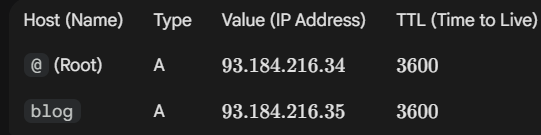
@ symbol: This means your main domain (example.com).
blog: This means a subdomain (blog.example.com).
AAAA record (Quad A)
AAAA record type is similar to A record type. It also accepts the domain name, and return the IP of that domain but in a IP version 6 format.
Example of a IPv6:
2001:db8:85a3:0:0:8a2e:370:7334.How AAAA records work:-
The process is the same as an A record.
You enter a domain name in your browser.
DNS is queried for the domain.
The DNS server returns the AAAA record (IPv6 address).
The browser connects to that IPv6 address.
CNAME Record (Nick Name)
A CNAME record (Canonical Name record) is used to make one domain name point to another domain name. Instead of pointing to an IP address, a CNAME points to another hostname.
In simple terms, you are giving your website a nick name.
Managing Subdomains: If you have multiple subdomains (such as blog.site.com, shop.site.com, app.site.com), you can point them all to your main domain, site.com. If the server's IP address changes, you only need to change the A record for the main domain; all the others will update automatically.
NS Record
NS stands for ‘nameserver,’ and the nameserver record indicates which DNS server is authoritative for that domain (i.e. which server contains the actual DNS records).
Basically, NS records tell the Internet where to go to find out a domain's IP address.
A domain often has multiple NS records which can indicate primary and secondary nameservers for that domain. Without properly configured NS records, users will be unable to load a website or application.
It is the server that stores all DNS records for a domain, including A records, MX records, or CNAME records

MX Record
- MX stands for mail exchange. This record validates the incoming mail requests and verifies it through the mail server and then further processes it.
- This is like having a P.O. Box for your letters. MX records direct email traffic to the correct server, ensuring your messages reach the right destination.
- MX records always point to a domain name (e.g. mail.myserver.com), never directly to an IP address. Therefore, an A record must also be present alongside the MX record, indicating the IP address of that mail server.
TEXT Record
- A TXT record (Text record) is used to store extra information about a domain. Unlike A, AAAA, CNAME, or MX records, TXT records are not used to route traffic. Instead, they are mainly used for verification, security, and configuration.
- TXT records can contain any text and TXT records are usually created by services, not manually written by users.
- TXT records play a critical role in preventing email spoofing, verifying domain ownership, Securing email communication, Integrating domains with external services. Without proper TXT records, emails may end up in spam or services may fail to verify your domain.
Conclusion
A / AAAA —> Tell browsers where the website lives
CNAME —> Allow multiple names to point to one domain
MX —> Tell email servers where to deliver mail
TXT —> Provide security rules and verification data
Hope you find this article helpful.
Have A Good Day!!